Networking basics
Created
A computer network is a set of nodes, such as computers, phones, and routers, that exchange data over shared links. Every network has a shape, the topology; two measures of speed, bandwidth and latency; and a stack of layers that each solve one part of moving data. Each layer wraps the data from the layer above in its own header, so a program sends bytes and the layers below turn them into frames on a wire.
Topology
A topology is the pattern of links between nodes. It decides what each link costs and how far one failure spreads.

- Point-to-point: one link between two nodes. Simple and private, but each new pair needs its own link.
- Daisy chain: nodes in a line, each linked to the next. A break cuts off every node beyond it.
- Bus: all nodes share one line, and every node receives every transmission. Only one node can send at a time without a collision.
- Star: each node links to a central hub or switch. Adding a node takes one link, and a broken link affects one node, but the center failing stops everything. Most wired office and home networks are stars around a switch.
- Ring: each node links to two neighbors, and data travels around the loop. One break stops a single ring; a second ring in the other direction routes around it.
- Full mesh: a link between every pair, n(n−1)/2 links for n nodes. The most paths and the most links.
- Hybrid: a mix, such as stars joined to each other. The internet is a hybrid: local stars joined by a partial mesh of routers.
Bandwidth and latency
- Bandwidth: how much data a link can carry per second, in bits per second (Mbit/s, Gbit/s).
- Throughput: how much data actually arrives per second, which is at most the bandwidth.
- Latency: how long one piece of data takes to get from sender to receiver. It adds up from propagation (distance at the speed of the signal, about 200,000 km/s in fiber), transmission (putting the bits on the wire), queuing in busy routers, and processing.
- Round-trip time (RTT): latency there and back, which is what
pingreports. Every request that waits for a reply costs at least one RTT. - Jitter: how much latency varies from one packet to the next.
Bandwidth decides how long large transfers take; latency decides how long small ones take. More bandwidth doesn’t lower latency. Two containers on one host, with the server’s traffic shaped by Linux’s tc netem, fetched files over HTTP, each on a new TCPTCP Transmission Control Protocol: the transport protocol that gives two programs a reliable, ordered stream of bytes over IP, on a connection opened with a handshake. connection:
| Link | RTT | 1 KB | 10 MB | 20 × 1 KB, one after another |
|---|---|---|---|---|
| 1 ms, 100 Mbit/s | 1.4 ms | 3 ms | 840 ms | 59 ms |
| 1 ms, 1 Gbit/s | 1.4 ms | 3 ms | 90 ms | 55 ms |
| 50 ms, 100 Mbit/s | 50 ms | 103 ms | 1,182 ms | 2,082 ms |
| 50 ms, 1 Gbit/s | 53 ms | 107 ms | 892 ms | 2,055 ms |
- A small request costs about two RTTs, one to open the TCP connection and one for the request and reply. At 50 ms RTT, 1 KB took about 100 ms whatever the bandwidth, and 20 small requests took 20 × 2 RTTs, about 2 s.
- At 1 ms RTT, 10 MB took about what bandwidth predicts: 80 megabits at 100 Mbit/s is 0.8 s, and at 1 Gbit/s 0.08 s.
- At 50 ms RTT, ten times the bandwidth sped 10 MB up by only a third. A new TCP connection starts with a small sending window and roughly doubles it each round trip, called slow start, so on a long path the round trips, not the bandwidth, limit it.
- Bandwidth-delay product: bandwidth × RTT is how much data must be in flight, sent but not yet acknowledged, to keep a link full. At 1 Gbit/s and 50 ms it’s 6.25 MB.
Programs on high-latency links send fewer round trips: they reuse connections, batch requests, and pipeline instead of waiting for each reply.
Layers
A layer is one part of the job of moving data, with a defined service to the layer above. Each layer uses only the one below and doesn’t depend on how it works, so Wi-Fi can replace Ethernet without changing TCP, and HTTP runs over any network IP runs over.
The OSI (Open Systems Interconnection) reference model, ISO/IEC 7498-1, has seven layers. It’s a vocabulary more than a protocol suite: “layer 2” and “layer 7” in everyday use come from it.
| # | OSI layer | Job | Examples |
|---|---|---|---|
| 7 | Application | The service a program uses | HTTP, DNS, SMTP |
| 6 | Presentation | How data is represented: encoding, compression, encryption | character encodings |
| 5 | Session | Dialog between two programs: opening, checkpoints, closing | rarely a separate protocol on the internet |
| 4 | Transport | Data between processes on two hosts, reliable or not | TCP, UDP |
| 3 | Network | Packets between hosts across networks, by routing | IP, ICMP |
| 2 | Data link | Frames between nodes on one link | Ethernet, Wi-Fi |
| 1 | Physical | Bits as signals | copper, fiber, radio |
The internet uses the TCP/IP model, described in RFC 1122, with four layers. Its application layer covers OSI’s top three, because TCP/IP leaves representation and sessions to each application:
| TCP/IP layer | OSI layers | Unit of data | Address |
|---|---|---|---|
| Application | 5–7 | message | host name, URL |
| Transport | 4 | segment (TCP), datagram (UDP) | port |
| Internet | 3 | datagram, usually called a packet | IP address |
| Link | 1–2 | frame | MAC address |
Encapsulation
On the way down, each layer puts its header in front of the data from the layer above: the transport layer adds ports, the internet layer adds IP addresses, and the link layer adds MAC addresses. On the way up, each layer reads its header, removes it, and hands the rest up. A layer treats everything after its header as opaque payload.
A packet capture of curl http://web/ between two containers showed the request as one 133-byte Ethernet frame:
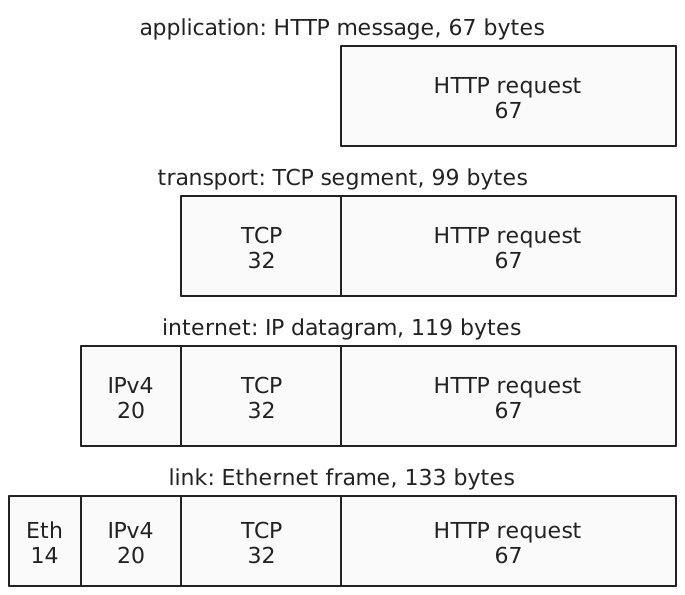
- HTTP, 67 bytes:
GET / HTTP/1.1and three header lines. - TCP, 32 bytes: the minimum 20, with source port 38976 and destination port 80, plus 12 bytes of timestamp options.
- IPv4, 20 bytes: the minimum, with source 172.22.0.3, destination 172.22.0.2, and protocol 6 for TCP.
- Ethernet, 14 bytes: destination MAC, source MAC, 6 bytes each, and the type
0x0800for IPv4. A 4-byte checksum at the end of the frame is checked and removed by the network card, so captures don’t show it.
Other headers: UDP 8 bytes, IPv6 40 bytes. A frame’s payload has a maximum size, the MTU (maximum transmission unit), which is 1,500 bytes on standard Ethernet. The TCP connection’s first packet announced an MSS (maximum segment size) of 1,460: 1,500 minus 20 for IP and 20 for TCP. Larger data is split across segments.
Addresses at each layer
- MAC address, 48 bits, such as
02:d4:68:4a:85:f1: names a network interface on one link. A router replaces the frame and its MAC addresses at every hop. - IP address: names a host’s interface across networks, and stays the same from end to end, apart from address translation (NATNAT Network address translation: rewriting the IP addresses, and often the ports, of packets as they pass a router, such as to share one public address among many hosts.). IPv4 addresses are 32 bits, such as
172.22.0.2; IPv6 addresses are 128 bits. - Port, 16 bits, 0 to 65535: names an endpoint inside a host, so many programs share one IP address. Servers listen on known ports, such as 80 for HTTP; a client’s operating system picks a temporary port for each connection, such as 38976.
- Host name: a name for people, such as
web, which DNS turns into an IP address before anything is sent.
A TCP connection is identified by five values: protocol, source IP, source port, destination IP, and destination port.
In a program
A program usually works at the transport layer and leaves the rest to the operating system. In Go, net.Dial("tcp", "web:80") names the transport and an address of host and port. The net package resolves the name, and the kernel builds the TCP, IP, and Ethernet headers and handles the handshake, retransmissions, and routing. net.Listen is the server’s side. Changing "tcp" to "udp" changes the transport; "tcp4" and "tcp6" fix the IP version. The Kubernetes network model builds pod addressing on the same internet and link layers.
References: RFC 1122: Requirements for internet hosts, ISO/IEC 7498-1: the OSI basic reference model, RFC 791: Internet Protocol, RFC 9293: Transmission Control Protocol, RFC 768: User Datagram Protocol, RFC 8200: IPv6, RFC 894: IP datagrams over Ethernet, RFC 5681: TCP congestion control, RFC 7323: TCP extensions for high performance, Go net package, tc-netem(8)