From containers to Deployments
Created · Updated
A Deployment is the object you usually create to run an application on Kubernetes: you give it a container imagecontainer image A package of the files and settings a container starts from, named like nginx:1.27 and stored in a registry such as Docker Hub. and a number of copies, and Kubernetes keeps that many running and updates them in a controlled way. It doesn’t run containers directly. It sits on three layers: a pod wraps containers, a ReplicaSet keeps a number of identical pods running, and the Deployment moves them from one version to the next. Each layer solves a problem the layer below it can’t, and one component watches each layer to keep it as you asked.
Container to pod
A container is a process that namespaces isolate and cgroups limit. Kubernetes never runs a container on its own. Its smallest unit is the pod: one or more containers that always run together on one nodenode A machine, physical or virtual, that runs pods in a Kubernetes cluster.. The schedulerscheduler The control plane component that watches for new pods with no node assigned and picks a node for each one to run on. assigns a node to a pod, not to a container, so all of a pod’s containers run on the same node.
The containers in a pod share a network namespacenetwork namespace A Linux namespace that gives a group of processes their own network interfaces, IP addresses, routes, and ports. The containers in a pod share one.. They have one IP address and one set of ports, and they reach each other on localhost. They can also share storage volumesvolume A directory of data that the containers in a pod can access. Its data survives when a container in the pod restarts.. Before starting any container, the kubeletkubelet The agent that runs on each node in a Kubernetes cluster and makes sure the containers in its pods are running. has the container runtimecontainer runtime The software on a node that runs containers. It pulls images and asks the kernel to set up each container. set up this shared context, called the pod sandbox, and then starts each container inside it. Most pods hold one container. A second container belongs in the same pod only when it must share the first one’s network or files, such as a helper that downloads the files a web server serves.

A pod stays on its node for its whole life. If a container exits, the kubelet restarts it inside the same pod, because a pod’s restart policy is Always by default. That’s as far as a pod can repair itself. If the pod is deleted or its node fails, the pod is gone, and Kubernetes never moves a pod to another node. A replacement has to be a new pod, with a new name and a new IP address, and something outside the pod has to create it.
Pod to ReplicaSet
That something is a ReplicaSet, which keeps a set number of identical pods running. It holds three things: a pod template, which describes the pods to create; a replica count; and a labellabel A key-value pair, such as app=web, attached to a Kubernetes object to identify it. A label selector uses labels to pick out a set of objects, such as the pods a ReplicaSet counts as its own. selector, which says which pods count as its own. The ReplicaSet controllercontroller A control loop that watches the cluster through the API server and makes or requests changes to move its current state toward the desired state., in the controller managercontroller manager The control plane component that runs the built-in controllers, such as the Deployment and ReplicaSet controllers, in one process., compares the number of matching pods with the replica count. If there are too few, it creates pods from the template. If there are too many, it deletes some. So a deleted pod or a failed node ends with a new pod, possibly on another node.

A ReplicaSet only counts pods, though. It doesn’t update the pods it already has. If you change its template, existing pods keep running the old version, and only pods it creates later use the new one. Moving every pod to a new image, without stopping them all at once, needs one more layer.
ReplicaSet to Deployment
A Deployment owns one ReplicaSet for each version of its pod template. When you change the template, for example to a new image, the Deployment controller creates a new ReplicaSet and scales it up while it scales the old one down. This is a rolling update. By default, it keeps at least 75% of the desired pods available and runs at most 125% of them. The old ReplicaSet stays, scaled to zero, so you can roll back. A Deployment keeps 10 old ReplicaSets by default. Changing only the replica count updates the current ReplicaSet and creates no new one.
You create and change Deployments, and the Deployment manages its ReplicaSets for you. The names show the chain. Each ReplicaSet is named after its Deployment plus a hash of its pod template, and each pod is named after its ReplicaSet plus five random characters. So a pod’s name tells you which Deployment it belongs to and which version of the template it runs.

Creating a Deployment
With the layers in mind, here is what one kubectlkubectl The command-line tool for working with a Kubernetes cluster. It sends requests to the API server. command sets off. Point at a part to see what it does. Show defaults to see the parts you can leave out.
kubectl create deployment web --image=nginx:1.27 --replicas=1 --namespace=defaultkubectlThe command-line client. It turns the command into a request to the API server.create deploymentCreate an object of type Deployment, built from the flags that follow.webThe Deployment’s name. Its ReplicaSets and pods are named after it, and kubectl gives its pods the labelapp=web, which the Deployment selects them by.--image=nginx:1.27The image for the pod’s one container. With no registry, the image comes from Docker Hub, so this isdocker.io/library/nginx:1.27. With no tag, it would benginx:latest. kubectl names the container after the image, herenginx.--replicas=1Default, can be left out. How many pods to run.--namespace=defaultDefault, can be left out. The namespace to create the Deployment in. Without this flag, kubectl uses the namespace of the current kubeconfig context, which isdefaultunless the context sets another.
kubectl sends the Deployment to the API serverAPI server The control plane component that serves the Kubernetes API. Every other component, and every tool such as kubectl, reads and changes cluster state only through it., which stores it in etcdetcd A consistent, highly available key-value store that Kubernetes uses to keep all cluster data. Only the API server talks to it.. kubectl’s part ends there. Every later step happens because a component watches the API server for one kind of object, does its own job, and writes the result back. The Deployment controller sees the new Deployment and creates a ReplicaSet from its template. The ReplicaSet controller sees the ReplicaSet with no matching pods and creates one. The scheduler sees a pod with no node, picks a node for it, and records that choice, which is called binding. The kubelet on that node sees the pod bound to it, has the container runtime pull the image and start the container, and reports the pod’s status. The layers are built from the top down, one controller at a time.

The same steps in time order are shown below as messages between components. Solid arrows are requests to the API server. Dashed arrows are changes the API server sends to a component that watches for them.
You can see the same chain on a real pod. The events at the end of kubectl describe pod list Scheduled, from the scheduler, then Pulling, Pulled, Created, and Started, from the kubelet. To list the pods and the nodes they landed on, add wide output to kubectl get:
kubectl get pods -o wide --namespace=defaultkubectl getList objects of one type in a table.podsThe type to list.podand the short namepowork too.-o wideAdd columns, including each pod’s IP address and node. Without it, kubectl prints a shorter table.--namespace=defaultDefault, can be left out. As before, the namespace of the current context.
The pod’s name has three parts:
web-6d4cf56db6-x8r2kwebThe Deployment’s name.6d4cf56db6The pod template hash. It’s the same in the ReplicaSet’s name, and it changes when the template changes.x8r2kFive random characters, so that each pod’s name is unique.
Changing it
Each change below is made at one layer, and the controllers below it do the rest. To run three pods instead of one, change the replica count on the Deployment:
kubectl scale deployment web --replicas=3kubectl scaleChange how many pods an object runs.deployment webThe object to scale.deployment/webmeans the same.--replicas=3The new desired count.
This only changes a number stored in the Deployment. The Deployment controller copies the new count to its ReplicaSet, and the ReplicaSet controller creates two more pods. You state the result you want, not the steps to get there. If you then delete a pod with kubectl delete pod, the ReplicaSet controller sees two pods where it wants three and creates a new one, with a new random suffix and a new IP address.
To update the pods, change the pod template, for example the image:
kubectl set image deployment/web nginx=nginx:1.28kubectl set imageChange the image of one or more containers in an object’s pod template.deployment/webThe object to change.nginx=nginx:1.28The container name, then its new image. The container is namednginxbecausekubectl create deploymentnamed it after its image.
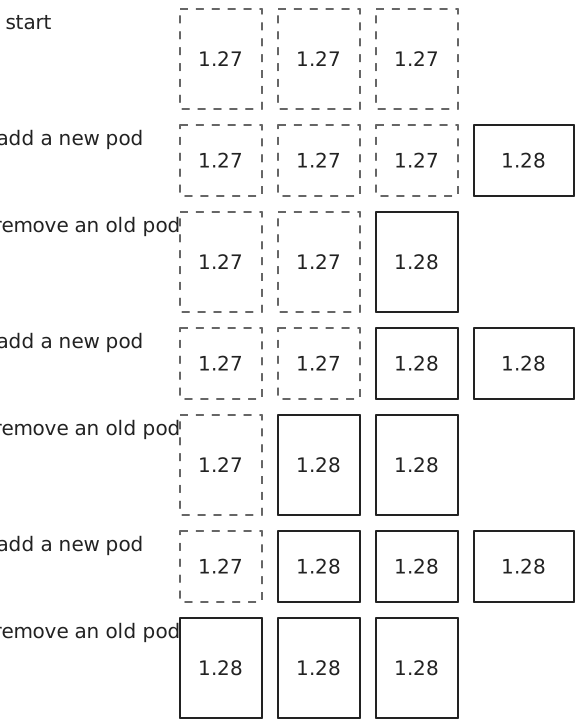
The template changed, so the Deployment controller creates a second ReplicaSet with a new hash in its name. With three replicas, the defaults round to at most one extra pod and none unavailable. So the Deployment starts one new pod, waits until it’s available, deletes one old pod, and repeats until all three run nginx 1.28. In the diagram below, each row is one step, and old pods have dashed borders. The old ReplicaSet is left with zero pods, and kubectl rollout undo deployment/web scales it back up.
The layers together
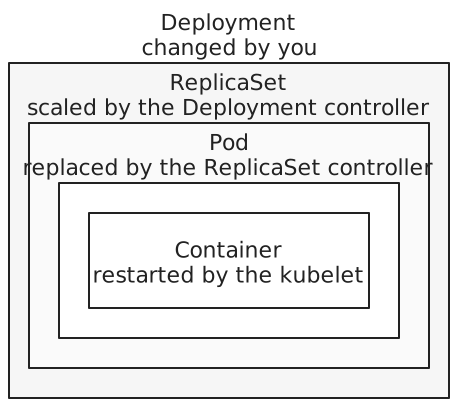
Each layer owns the one inside it, and one component acts on each:
One thing none of these layers gives is a stable address. Every replacement pod gets a new IP address, so clients can’t rely on any one pod’s address. A Service fills that gap: it gives a set of pods one address that stays the same while the pods behind it change.
References: Pods, Pod lifecycle, ReplicaSet, Deployments, kubectl create deployment, kube-scheduler, Images